 Front Counter
Run the shop.
Keep the books.
Front Counter puts your sales, invoices, customers, inventory and real double-entry accounting in one simple app on your own PC. No monthly fees. No spreadsheets.
14-day free trial · No credit card · Windows 10 & 11 · Version 1.2.0
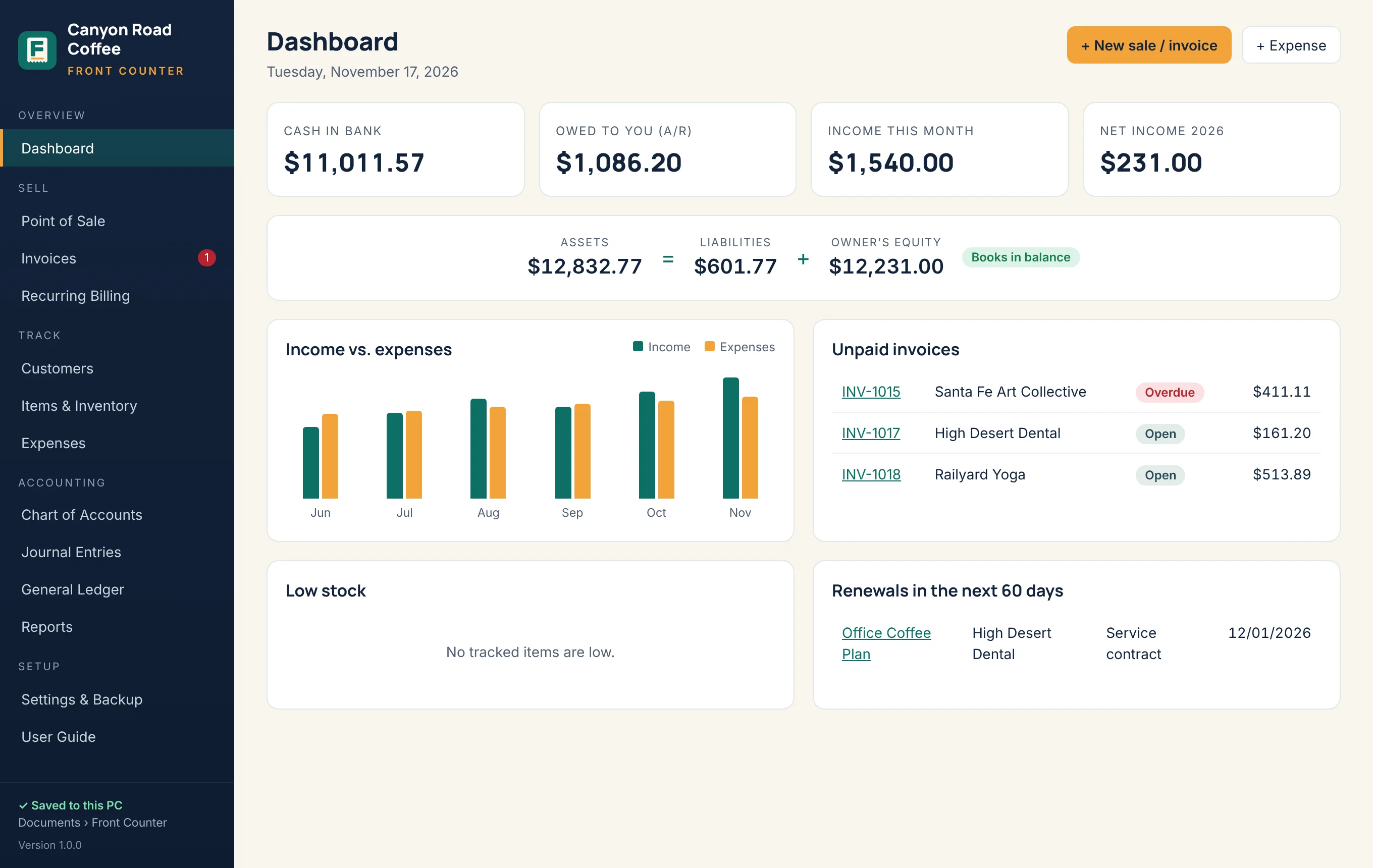
Everything at the front counter
One app for selling and bookkeeping
Built for shops, studios, salons, cafés, contractors and service businesses that want to stop juggling a card reader, a spreadsheet and a shoebox of receipts.
Point of sale & invoices
Tap items to ring up a sale or send an invoice with your name and logo. Take part payments and see what’s overdue at a glance.
Recurring billing
Monthly plans, memberships and service contracts invoice themselves on schedule. One click generates everything that’s due.
Customers & records
Contacts, balances, invoice history and the contracts, subscriptions or equipment you look after for each customer, with renewal reminders.
Inventory
Track stock, average cost and reorder levels. Every sale lowers stock and records the true cost of what you sold.
Real accounting
Double-entry books with a chart of accounts you can rename, journal entries, general ledger, profit & loss, balance sheet, cash flow and trial balance. Enter vendor bills and pay them later.
Business reports
Profit & loss, balance sheet, cash flow, sales by customer or item, expenses by category or vendor, and receivables and payables aging.
Easy switching
Coming from QuickBooks, Square, Wave, Xero, FreshBooks or spreadsheets? Import your customers, products, opening balances and unpaid invoices and bills in five guided steps.
Sales tax by location
Pick your state at setup and Front Counter fills in the base rate, links you to your tax agency’s lookup and builds your sales tax report.
Sell
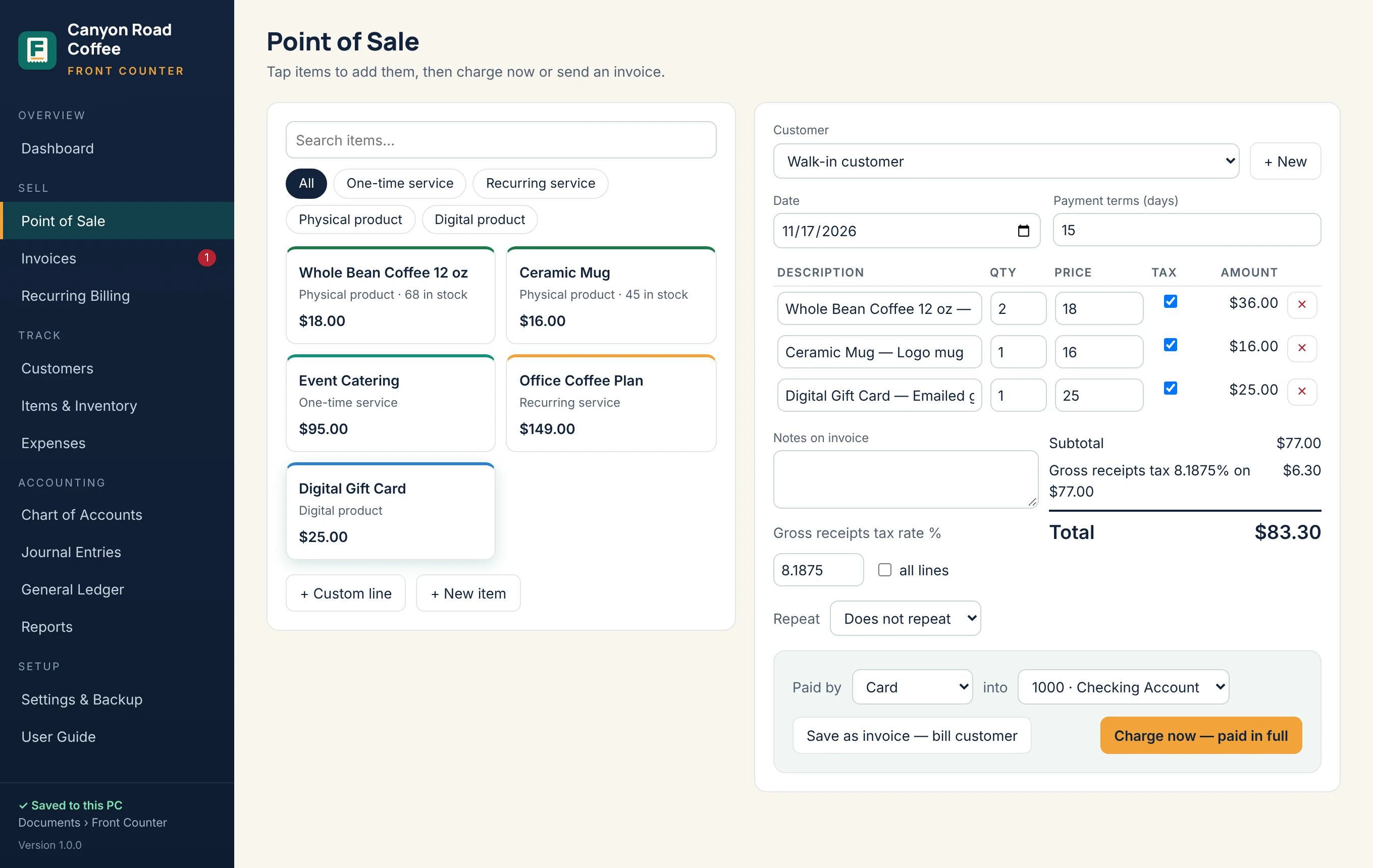
Ring it up or bill it later
Tap services and products to build a sale. Charge it now and print a receipt, or save an invoice with your terms and send it as a PDF.
- Tax on or off for each line, at the rate for your location
- Cash, card, check, Zelle, Venmo or ACH payments, in full or in part
- Repeat any invoice weekly, monthly, quarterly or yearly
Keep the books
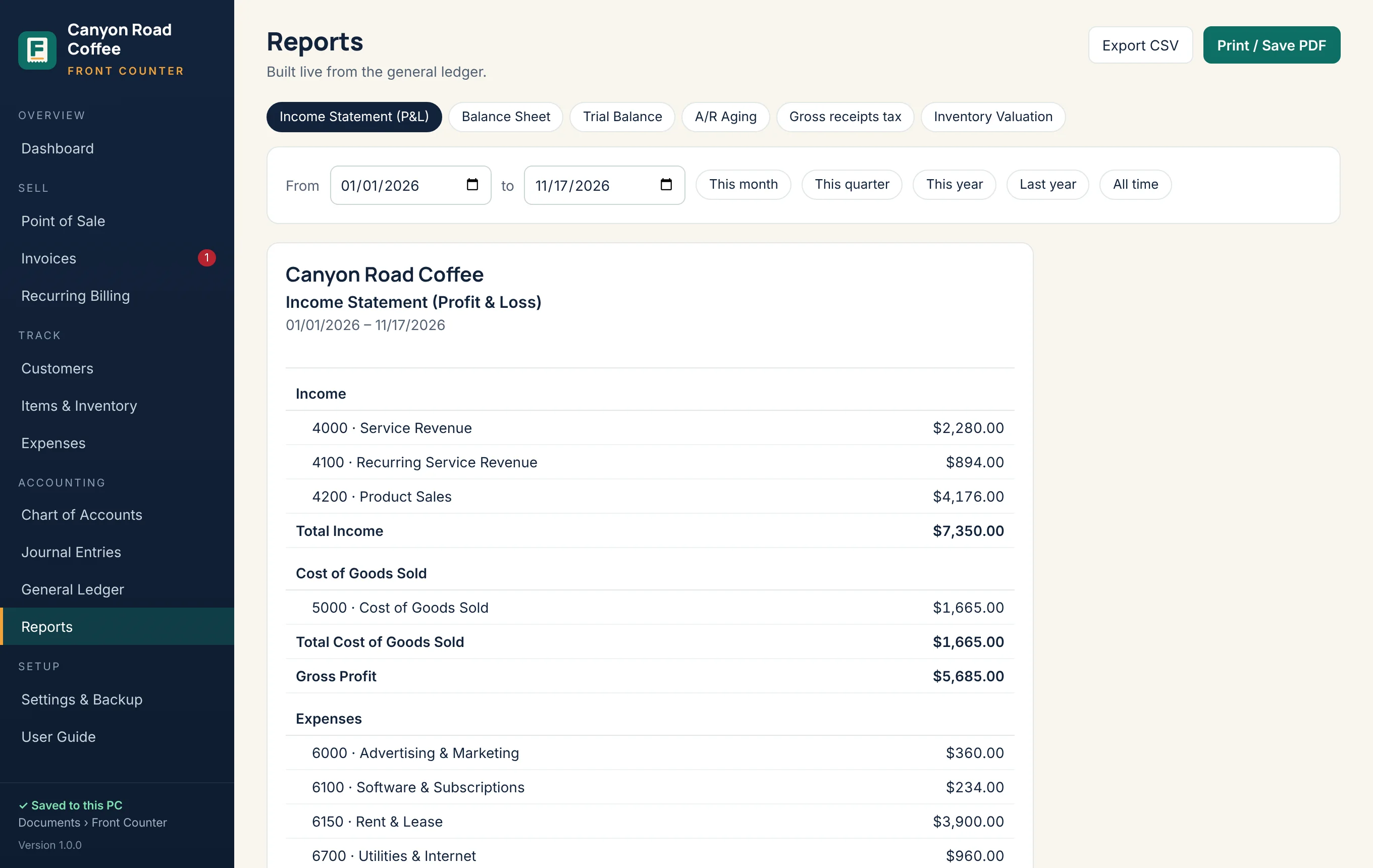
Accounting that does itself
Every sale, payment, expense and stock change posts balanced debits and credits for you, so your reports are always up to date.
- Income statement, balance sheet and trial balance
- Money owed to you by age, and a sales tax report for filing
- Print, save as PDF or export to a spreadsheet for your accountant
Built on real accounting
Your books always balance
Front Counter follows the accounting equation behind every set of books, and checks it on your dashboard every time you open the app.
Your data stays yours
Your books live on your computer, not in someone else’s cloud. Nothing about your sales or customers is sent to us.
Automatic backups
Choose OneDrive, Google Drive or a USB stick and Front Counter keeps a dated copy there every day as you work.
Help, day or night
A built-in step-by-step guide, plus a 24/7 help assistant and real people at support@magikcitymedia.com.
Stock
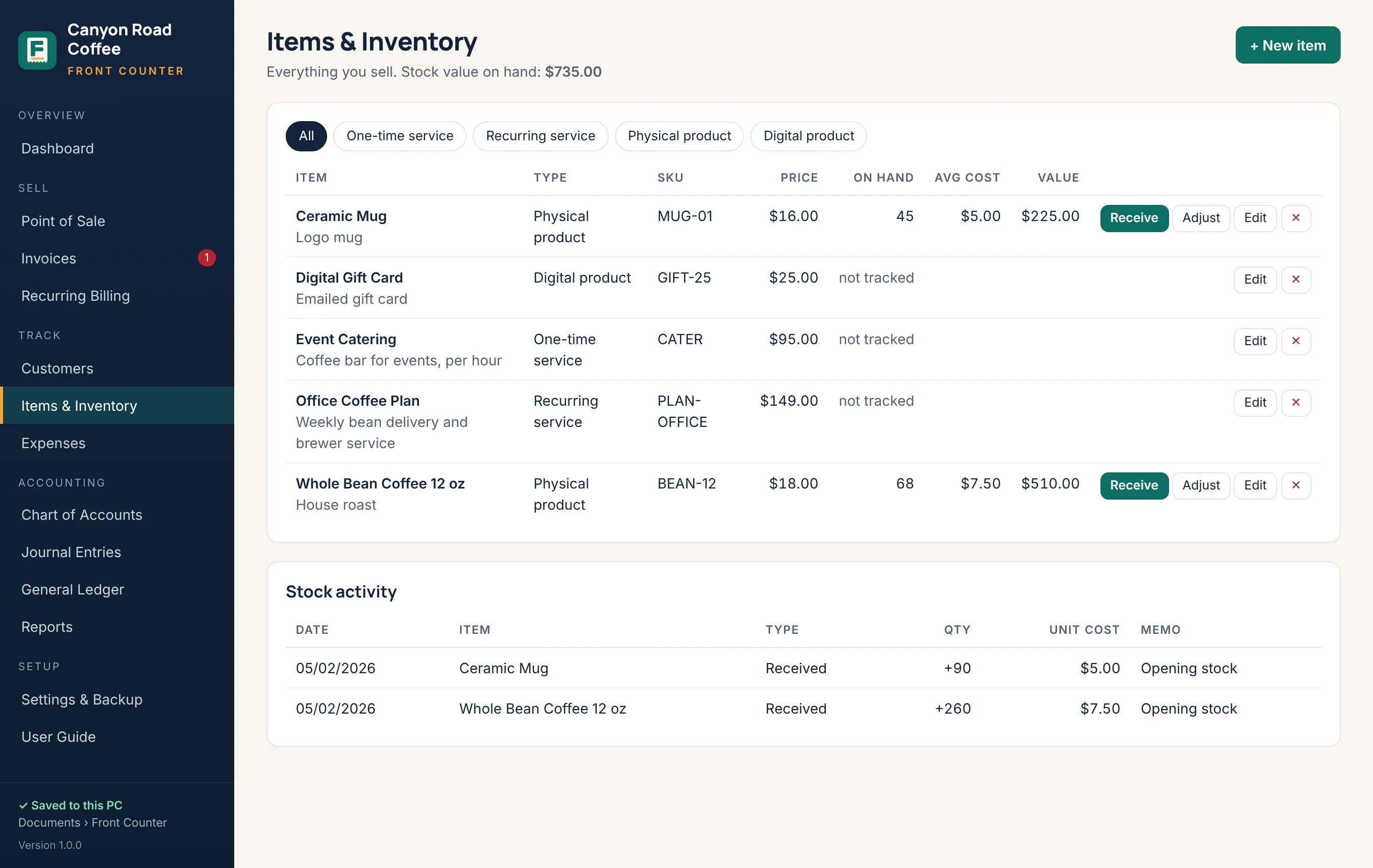
Know what’s on the shelf
Receive stock, adjust after a count and see low items on your dashboard. Front Counter values your inventory at average cost automatically.
- Physical products, digital products, services and plans
- Low-stock alerts at the level you choose
- Inventory valuation report
Pricing
Pay once. Use it for years.
No subscription. Try everything free for 14 days, then buy a license when you’re ready.
Plus any sales tax due where you live
- Use it on 2 computers at a time
- Every feature: sales, invoices, inventory, accounting and reports
- Free version 1 updates; your version keeps working forever
- Email support and the 24/7 help assistant
- 30-day money-back guarantee
Secure checkout by Stripe. Your license key appears right after payment and is emailed to you.
Questions
What does Front Counter do?
Front Counter runs the front of your business and keeps the books behind it: a point of sale and invoicing, recurring billing, customers, inventory, expenses, and real double-entry accounting with a chart of accounts, journal, general ledger and full reports: profit and loss, balance sheet, cash flow, sales, expenses, and receivables and payables aging. You can also enter vendor bills and pay them later. Every sale and payment posts to the books automatically.
What computer do I need?
A PC with Windows 10 or Windows 11 (64-bit). Front Counter does not run on Mac, Chromebook, iPad or phones. It opens in its own window using Microsoft Edge, which comes with Windows.
How does the free trial work?
Download and install Front Counter and you get 14 days of full use, no credit card needed. When the trial ends your books are never deleted: you can still view, print, export and back them up, and adding or editing needs a license key.
How much does it cost?
$99 once, not a monthly fee. One license works on 2 computers at a time (for example, the front counter and the back office) and includes free updates for version 1 (fixes and improvements). Major new versions, such as a future 2.0, are an optional paid upgrade. The version you buy keeps working forever.
Where are my books stored? Is my data private?
On your own computer, in Documents › Front Counter. Your sales, customers and books are never uploaded to us. Front Counter only goes online to activate and occasionally check your license key. You can also turn on automatic backups to OneDrive, Google Drive or a USB stick.
Can I switch from QuickBooks or another program?
Yes. Open Import / switch in the app. It reads CSV and Excel files and QuickBooks Desktop .iif files from QuickBooks, Square, Wave, Xero, FreshBooks and spreadsheets. Pick a start date, then import your customers, products and services, your opening balances (a trial balance), and your unpaid invoices and bills. Your old history stays in your old program, and every import can be undone.
How do I install it?
- Click Download free trial and open FrontCounter-Setup-1.2.0.exe.
- If Windows shows “Windows protected your PC”, click More info, then Run anyway. Only do this for the installer you downloaded from this website.
- Click through the installer. No administrator password is needed.
- Open Front Counter from the desktop or Start menu shortcut and answer the short setup questions.
I bought a license. How do I activate it?
Your key appears on the thank-you page after checkout and in your purchase email. In Front Counter, go to Settings & Backup › License, click Enter license key, paste the key and click Activate. The computer needs the internet for a moment; after that Front Counter works offline.
How do I move Front Counter to a new computer?
On the old computer: Settings & Backup › Download backup (or use your automatic backup folder), then License › Remove license from this computer. On the new computer: install Front Counter, use Restore from backup…, then enter your key. If the old computer is broken, email us and we will free up your key.
I lost my license key.
Search your email for “Your Front Counter license key”, or email support@magikcitymedia.com from the address you bought with and we will send it again.
Does it take card payments, run payroll or file taxes?
No. Take cards with your usual card reader, then record the sale in Front Counter as paid by card. Front Counter has no payroll and does not file tax returns. It works out sales tax on your invoices and gives you the sales tax report and books your accountant needs.
Can I get a refund?
Try everything free for 14 days first. If Front Counter still isn’t right for you, email support@magikcitymedia.com within 30 days of purchase for a full refund.
How do I get help?
Ask the help assistant on the Support page any time, read the User Guide, or email support@magikcitymedia.com. In the app, Settings & Backup › Help & support › Copy support info copies details we need (no customer names or amounts) to paste into your email.
Ready to open up?
Install Front Counter in about a minute and set up your business in two.